Symptom file · cutting out
Mic keeps cutting out? Is it the gate, the suppressor or the link

When people say your mic "keeps cutting out," they mean words or the ends of sentences go missing. That silence was produced somewhere, and only four places produce it routinely: a gate that decides you're not talking, a suppressor that decides your voice is noise, a wireless link that drops packets, or another program that takes the microphone away. The input meter tells them apart in about a minute.
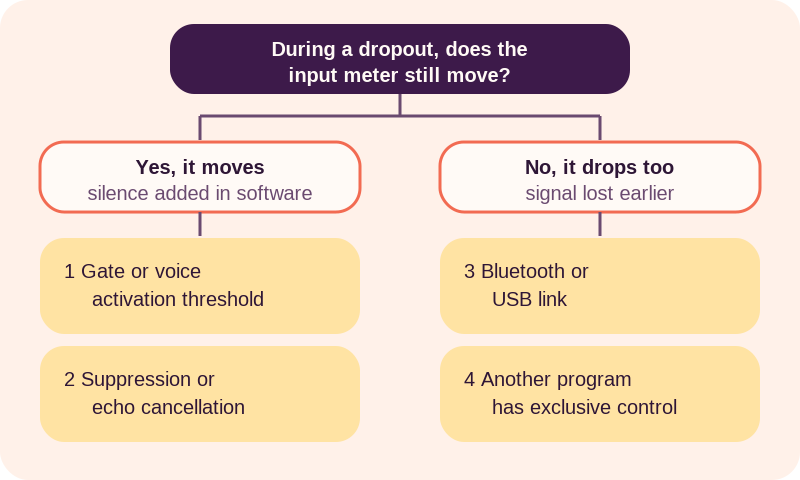
The meter test: does the silence reach your computer?
Open your system's input settings so you can see the level meter, start a test call or a local recording, and speak in the way that triggers the problem: trailing off at the ends of sentences, talking quietly, or talking while someone else does.
- The meter keeps moving but your voice still drops. The signal is reaching the computer, so a processing stage after it is deciding to silence you. That's a gate or a suppressor, causes one and two.
- The meter itself freezes or falls to nothing. The signal is being lost before software gets it: a wireless link, a port, or a program holding the device. That's causes three and four.
Cause 1: a gate or voice activation set too high
Many calling and chat apps don't transmit continuously. They open when your level crosses a threshold and close when it falls below, which is a noise gate by another name; some call it input sensitivity or voice activity. Set too high, the gate shuts on soft consonants, quiet words and the tails of sentences. The giveaway is that you're cut off when you speak softly and never when you speak firmly. Lower the threshold, or switch the app to automatic sensitivity and test again. The full comparison of gates and suppression lives in gate versus suppression.
Cause 2: suppression or echo cancellation clipping words
Noise suppression can mistake quiet speech for background, and echo cancellation can briefly duck your mic when the other person talks at the same moment. A common forum complaint, for example on Microsoft's community board, is a mic that "cuts off when other people are talking," which fits that second pattern. Turn suppression down a level and see whether the dropouts ease. If they happen only during overlapping speech, you're hearing the echo canceller doing its job a little too keenly; wearing headphones gives it less to cancel and often makes the clipping rarer.
Cause 3: the wireless or USB link
Bluetooth headsets drop audio when the radio link struggles: distance, a body between headset and computer, or a crowded room of other devices. Short gaps that follow you as you move are the signature. Stay close to the computer for a test call or capture with a wired mic. With USB mics, try another port directly on the computer rather than through a hub. If the dropouts follow the cable when you wiggle it, the problem is physical, and the desk's software remit ends there.
Cause 4: another program has the microphone
On Windows, a program can open the mic in exclusive mode. Microsoft's documentation says exclusive-mode streams seize the audio endpoint and that exclusive access is enabled by default but can be disabled per device. If a recorder, game chat or helper utility grabs the mic, your calling app can lose it mid-sentence. Clear the two Exclusive Mode checkboxes: classic Sound control panel, Recording tab, your mic, Properties, Advanced. Then close audio programs you don't need during calls.
| Cause | Tell-tale sign | Free fix |
|---|---|---|
| Gate or voice activation | Soft words and sentence endings vanish | Lower the threshold or use automatic sensitivity |
| Suppression or echo cancellation | Drops while others talk, or in noisy rooms | Suppression down a level; headphones |
| Wireless or USB link | Meter freezes; gaps follow movement | Move closer; wired mic; another port |
| Exclusive control | Mic lost when another program opens | Untick Exclusive Mode; close extra audio apps |
If it's choppy rather than missing
Words that arrive broken, stuttering or metallic rather than absent belong to a different file. That's usually an overloaded processor or a congested connection, and the robot file deals with both. A local recording settles it: if the recording is clean and smooth, the call's delivery is the problem, not your microphone.
Lower the gate without letting the room in
People raise gates to keep keyboards and fans out, then lose their quiet words. Suppression that removes the room while leaving speech intact lets you lower the gate safely. Krisp does that for whichever meeting app you open, on a PC or a Mac; you pay only once a seven-day, card-free trial with everything unlocked runs out, from $8 a seat a month when billed annually (as Krisp listed it on 18 October 2026).
Try Krisp with your gate lowered All four fixes above cost nothing.Cutting-out questions, answered
Why does my mic keep cutting out on calls?
Usually a gate or voice-activation threshold set too high, noise suppression treating quiet speech as noise, a struggling Bluetooth or USB link, or another program taking the mic. Watch the input meter during a dropout to tell which.
Why does my mic cut out when other people talk?
Echo cancellation can duck your mic during overlapping speech. It happens more on open speakers, because there's more to cancel. Headphones usually make it rarer.
Why does my mic cut off the ends of my sentences?
A gate closes when your level drops, and sentence endings are quiet. Lower the threshold or switch to automatic sensitivity, and set your gain properly so your voice sits well above the room.
Can another app make my mic cut out?
Yes. On Windows, a program with exclusive control can seize the microphone. Turn off exclusive mode for the microphone in the classic Sound panel and close audio programs you aren't using.
Is a cutting-out mic broken?
Rarely. Most cases are settings. If dropouts follow the cable when you move it and survive every software fix, then it's physical, and a repair or replacement is beyond this desk.