Symptom file · distorted
Mic sounds distorted on calls? Clipping, boost and processing, untangled
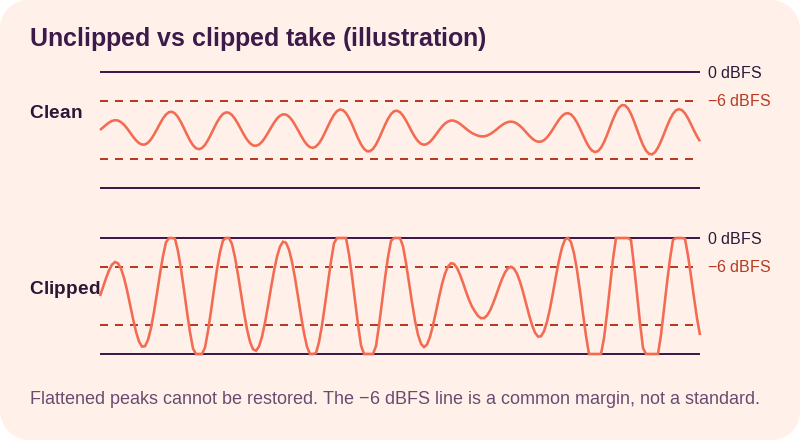
Distortion comes in two families that sound alike and are fixed in opposite ways. One is clipping: your signal is louder than the system can represent, so the tops of the waveform are sliced off and the voice turns to gravel. The other is processing: suppression, leveling or a codec mangling a perfectly healthy signal on its way out. Turn the gain down on the first and it vanishes; turn it down on the second and you simply sound quieter and hissier. So before touching a slider, find out which family you're in. It takes two recordings.
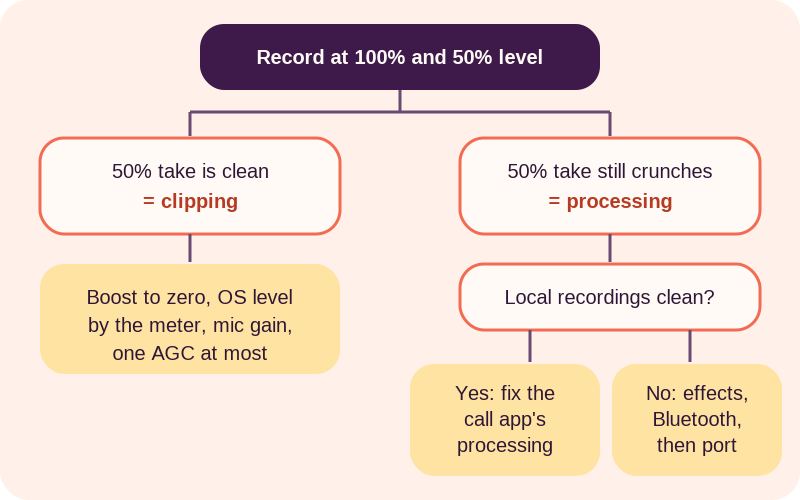
Is it clipping or processing? The two-recording test
- Record ten seconds at your normal settings, speaking at your real call volume, including one laugh or emphatic word. Any recorder works; Audacity is free.
- Lower the input level by roughly half in your system's input settings and record the same sentences again.
- Compare on headphones. If the crunch is gone in the second take, you were clipping: the fix is gain, and the next two sections are yours. If the crunch survives at the lower level, the signal was never too loud. Skip to "processing artifacts."
Recording locally matters. It removes the network and the calling app's processing from the picture, so whatever you hear is coming from the mic, the driver or your settings. If the local takes are clean but people on calls still hear distortion, the call's own processing is responsible.
Clipping: where the extra gain comes from
Gain can be added at several stages, and clipping happens wherever the total first exceeds the ceiling. The usual suspects, in the order we'd check them:
- Microphone Boost on Windows. Microsoft's troubleshooting documentation places it on the Levels tab of the microphone's Properties, next to the Microphone slider, in the classic Sound control panel. It adds a fixed lift before everything else; if it's above zero and you clip, take it back to zero first.
- The OS input level. On Windows, Settings, then System, then Sound, then your input device's properties. On a Mac, System Settings, then Sound, then Input. Apple's own documentation gives the example of lowering input volume when a source is loud so the sound isn't distorted.
- The mic's own gain. A dial on the mic, or a slider in its companion app. Set too high, it clips before the computer sees anything, and no software setting downstream can repair it.
- Automatic gain control overshooting. An app that turns you up during quiet moments can push the next loud word over the edge. Our quiet-mic file explains why a single fixed level beats a helper that keeps second-guessing you.
Setting a safe peak level for calls
Set gain by your loudest normal moment, not your average one. Speak, laugh and say your most emphatic sentence while watching the input meter. On the operating system's meter, a working rule is that natural speech should sit around three-quarters with the loudest bursts never touching the top. In a recorder that shows decibels, many people aim for peaks no higher than about −6 dBFS. Treat that as a common practice rather than a standard; the point is a margin, and laughter needs one. The full reasoning behind setting levels from the microphone outward is in gain versus volume.
Order matters for hiss. If you need more level after removing boost, raise the earliest stage first (the mic's own gain), then the OS level, and leave the app slider near neutral. Raising a late stage to compensate amplifies the noise floor along with you.
Processing artifacts that sound like distortion
If your quiet take still crunches, something is processing the signal. Common offenders:
- Aggressive noise suppression, which can leave speech gargled or "underwater," especially when your voice is low compared with the room. Lower its strength, or raise your gain correctly so it has more voice to work with.
- Driver enhancements, including built-in compressors and effects. Microsoft's sound troubleshooter suggests switching Audio enhancements off, so test that way first.
- A limiter pushed hard, in a mixer or a streaming tool, which flattens your peaks deliberately and can sound similar to clipping.
- Sample-rate disagreements, which produce crackle and grit rather than steady distortion; our static file covers them.
- Bluetooth's call mode, whose narrow, heavily coded voice channel can sound harsh and crunchy as well as thin.
| Test result | Family | Fix, in order |
|---|---|---|
| Crunch gone at half the level | Clipping | Boost to zero; OS level by the meter; mic gain; one AGC at most |
| Crunch stays at half the level | Processing | Enhancements off; suppression gentler; check limiters and Bluetooth |
| Local takes clean, calls distorted | Call processing | App suppression and auto-adjust; try the desktop app vs the browser |
| Crackle that comes and goes with movement | Connection | Another port or cable; then stop and seek a repair |
When it's the cable or the port (one honest paragraph)
If the distortion crackles when you move the cable, comes and goes with the angle of a plug, or survives every setting above, the problem may be physical. Try another USB port and, if the mic has a removable cable, another cable. If that cures it, you've spent nothing. If it doesn't, this desk's remit ends: software can't mend a damaged capsule or connector, and we don't recommend what to buy.
Edge cases worth a second look
- Only your laugh distorts. Your gain is set for conversation and not for your loudest moments. Lower it slightly and accept a touch more level from the next stage.
- Pops on "p" and "b". Those thumps are plosives, puffs of breath striking the capsule, not clipping in the usual sense. Angle the mic slightly off your mouth; a high-pass filter can soften what remains.
- Distortion in one app only. That app's processing or its own input slider is the cause. Reset its audio settings and switch its automatic adjustment off.
- It started after a driver update. Updates can re-enable enhancements and reset boost. Check both before anything else, and roll the driver back through the OS if the timing fits.
Clean level first, then the room
Once your gain sits properly below the ceiling, the next thing callers notice is the room. Krisp strips background noise from that clean signal before Zoom, Teams or any other app receives it, on Windows or a Mac. Seven trial days come first, every feature unlocked and no card asked for; after that the Core plan is $8 a seat per month on an annual bill (Krisp's pricing page, 18 October 2026).
Add Krisp after the gain fix Every gain fix above is free.Distortion questions, answered
Why does my mic sound distorted on calls?
Either it's clipping, because too much gain is applied somewhere, or a processing stage is mangling a healthy signal. Record once normally and once at half the input level: if the second is clean, it's gain; if not, it's processing.
How do I stop my mic from clipping?
Set Windows' Microphone Boost to zero, lower the OS input level until your loudest laugh stays below the top of the meter, and set the mic's own gain sensibly. Keep automatic gain control off or to one layer.
Does Microphone Boost cause distortion?
It can. Boost adds a fixed amount of gain before everything else, so a loud voice can exceed the ceiling. If you clip with boost above zero, remove it first and raise the regular level instead.
What level should my mic peak at?
Below the top with room to spare. On an OS meter, natural speech around three-quarters works well. In a recorder showing decibels, a common rule of thumb is peaks no higher than about −6 dBFS.
Can noise suppression make my voice sound distorted?
Yes, set too strongly or fed a quiet voice in a noisy room, it can sound gargled or watery. Lower its strength or correct your gain so the voice stands well above the noise.